KONTRON AIS
Creating the framework for tomorrow's plant control
UX concept for industrial applications with different usage contexts
Sector
Industrial Manufacturing
Period
since 2019
Starting position
Kontron AIS develops software solutions for industrial applications, embedded in distributed systems and IoT environments. The product range comprises components for visualizing, controlling and analyzing technical processes in areas such as production, logistics or smart infrastructure.
Central requirements: high functionality, technical precision and resilience. At the same time, the products should be accessible to different user groups — from experienced engineers to local operational users. Many communication channels, role models and contexts of use came up with an interface that was primarily functionally oriented but was not consistently user-centered.
The challenge was not to reduce technical complexity. Rather, it was about translating it into a clear, consistent UX language that supports different working methods and usage situations.
Starting position
Kontron AIS develops software solutions for industrial applications, embedded in distributed systems and IoT environments. The product range comprises components for visualizing, controlling and analyzing technical processes in areas such as production, logistics or smart infrastructure.
Central requirements: high functionality, technical precision and resilience. At the same time, the products should be accessible to different user groups — from experienced engineers to local operational users. Many communication channels, role models and contexts of use came up with an interface that was primarily functionally oriented but was not consistently user-centered.
The challenge was not to reduce technical complexity. Rather, it was about translating it into a clear, consistent UX language that supports different working methods and usage situations.
Starting position
Kontron AIS develops software solutions for industrial applications, embedded in distributed systems and IoT environments. The product range comprises components for visualizing, controlling and analyzing technical processes in areas such as production, logistics or smart infrastructure.
Central requirements: high functionality, technical precision and resilience. At the same time, the products should be accessible to different user groups — from experienced engineers to local operational users. Many communication channels, role models and contexts of use came up with an interface that was primarily functionally oriented but was not consistently user-centered.
The challenge was not to reduce technical complexity. Rather, it was about translating it into a clear, consistent UX language that supports different working methods and usage situations.
Approach
Together with Kontron AIS, UseTree has launched a user-centered design process that starts on three levels:
- Analyzing real usage contexts
The focus was on the question: How do people actually use the software in everyday work? Which tasks come first? What information is critically needed? Through workshops, interviews and analyses, common usage patterns were identified and clear priorities were identified. - Unifying information architecture
The various modules in the product family should not only function individually, but should also offer a coherent experience as a group. For this purpose, a common structure was developed that uses recurring patterns and consistent terminology. Different service offerings are thus combined into a single logical framework. - Interaction principles for industrial use
Industrial software is used in demanding situations: in real time, under time pressure and often in environments with many processes running in parallel. As a result, UseTree defined interaction principles that take information density, prioritization and focus into account. Decisive interactions were reduced and relevant information was highlighted.
In essence, it was not a question of redesigning individual screens, but a solid structural basis that connects all product lines.
Approach
Together with Kontron AIS, UseTree has launched a user-centered design process that starts on three levels:
- Analyzing real usage contexts
The focus was on the question: How do people actually use the software in everyday work? Which tasks come first? What information is critically needed? Through workshops, interviews and analyses, common usage patterns were identified and clear priorities were identified. - Unifying information architecture
The various modules in the product family should not only function individually, but should also offer a coherent experience as a group. For this purpose, a common structure was developed that uses recurring patterns and consistent terminology. Different service offerings are thus combined into a single logical framework. - Interaction principles for industrial use
Industrial software is used in demanding situations: in real time, under time pressure and often in environments with many processes running in parallel. As a result, UseTree defined interaction principles that take information density, prioritization and focus into account. Decisive interactions were reduced and relevant information was highlighted.
In essence, it was not a question of redesigning individual screens, but a solid structural basis that connects all product lines.
Approach
Together with Kontron AIS, UseTree has launched a user-centered design process that starts on three levels:
- Analyzing real usage contexts
The focus was on the question: How do people actually use the software in everyday work? Which tasks come first? What information is critically needed? Through workshops, interviews and analyses, common usage patterns were identified and clear priorities were identified. - Unifying information architecture
The various modules in the product family should not only function individually, but should also offer a coherent experience as a group. For this purpose, a common structure was developed that uses recurring patterns and consistent terminology. Different service offerings are thus combined into a single logical framework. - Interaction principles for industrial use
Industrial software is used in demanding situations: in real time, under time pressure and often in environments with many processes running in parallel. As a result, UseTree defined interaction principles that take information density, prioritization and focus into account. Decisive interactions were reduced and relevant information was highlighted.
In essence, it was not a question of redesigning individual screens, but a solid structural basis that connects all product lines.
Solution
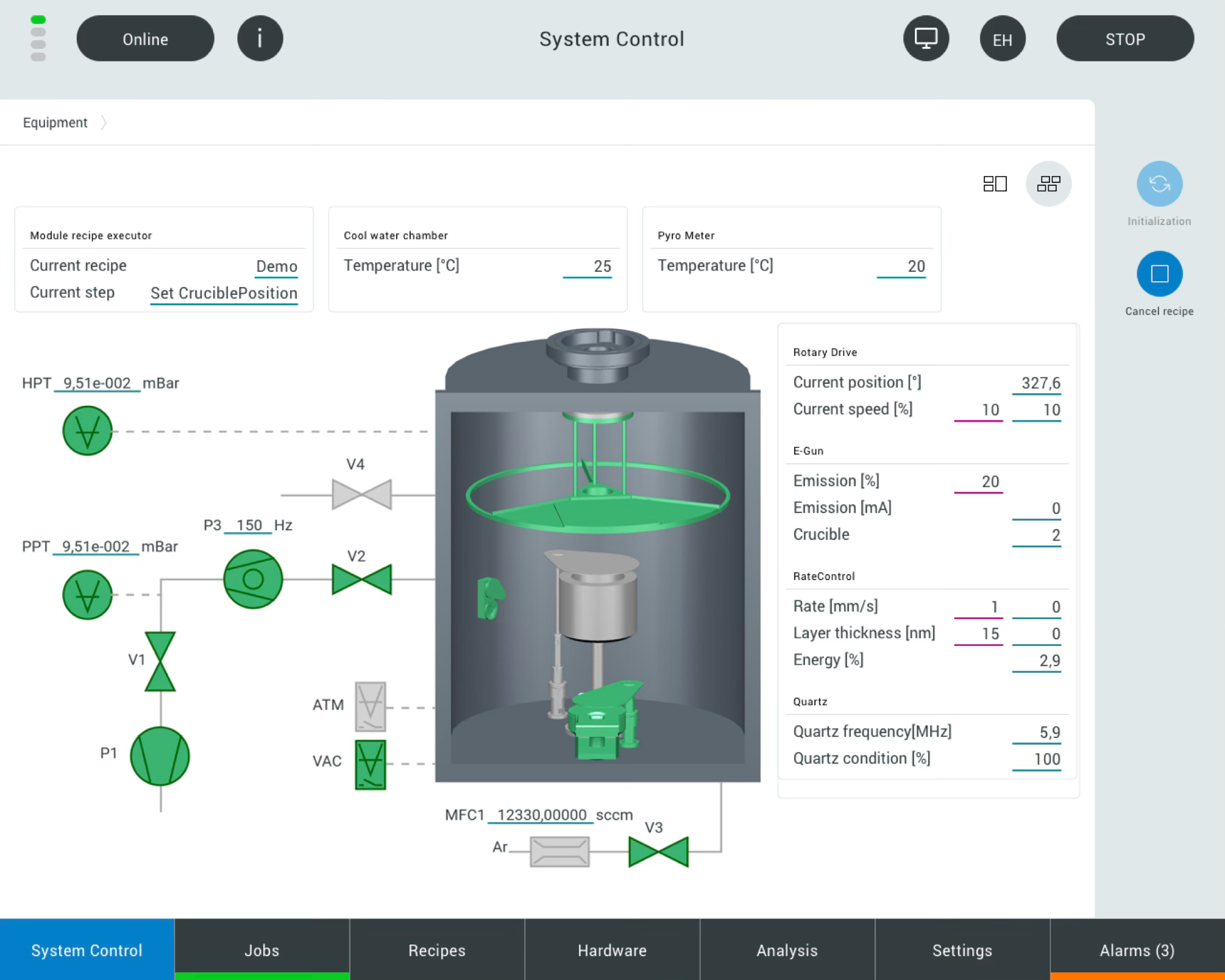
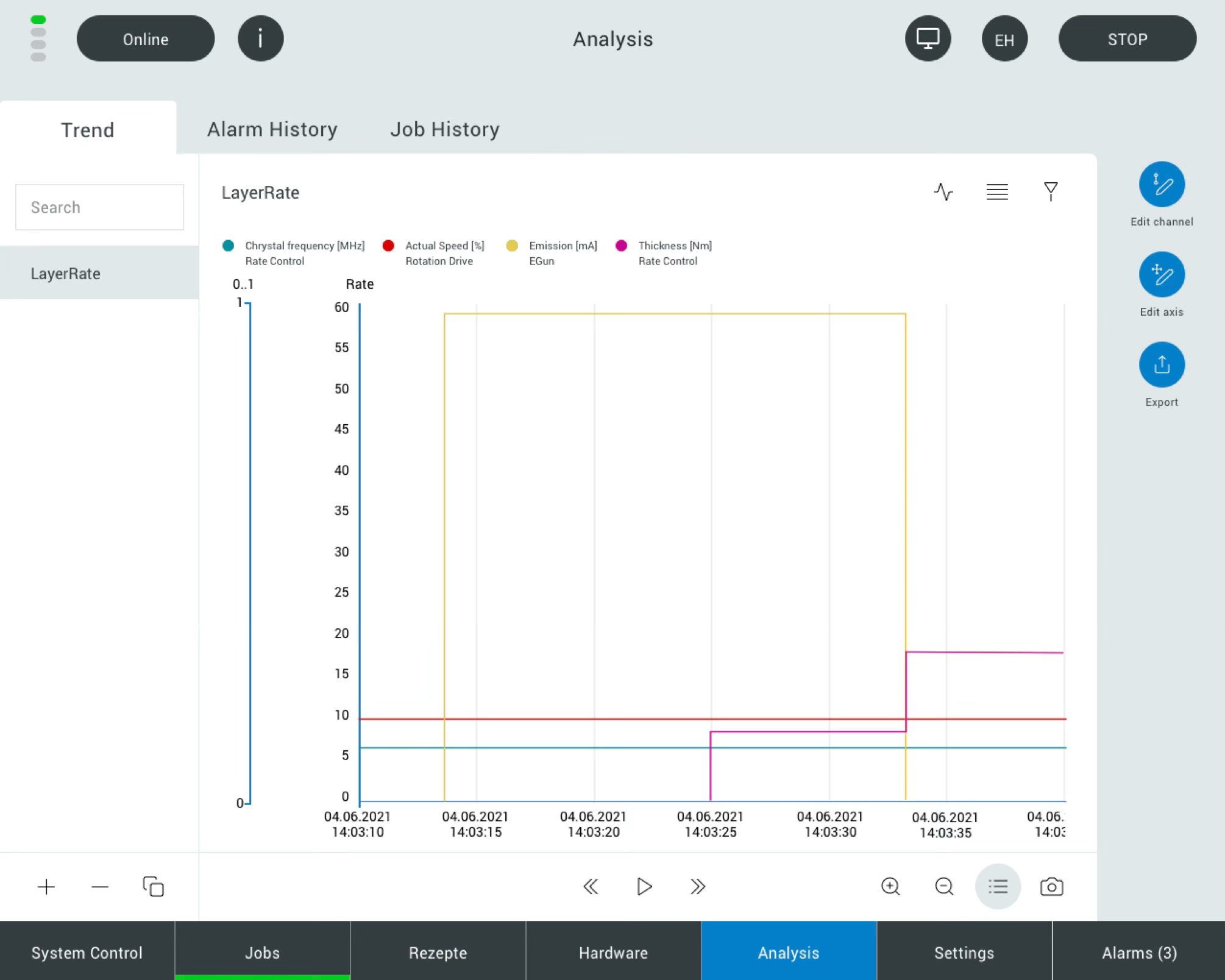
The joint UX concept resulted in a modular, consistent UX system for the Kontron AIS product family:
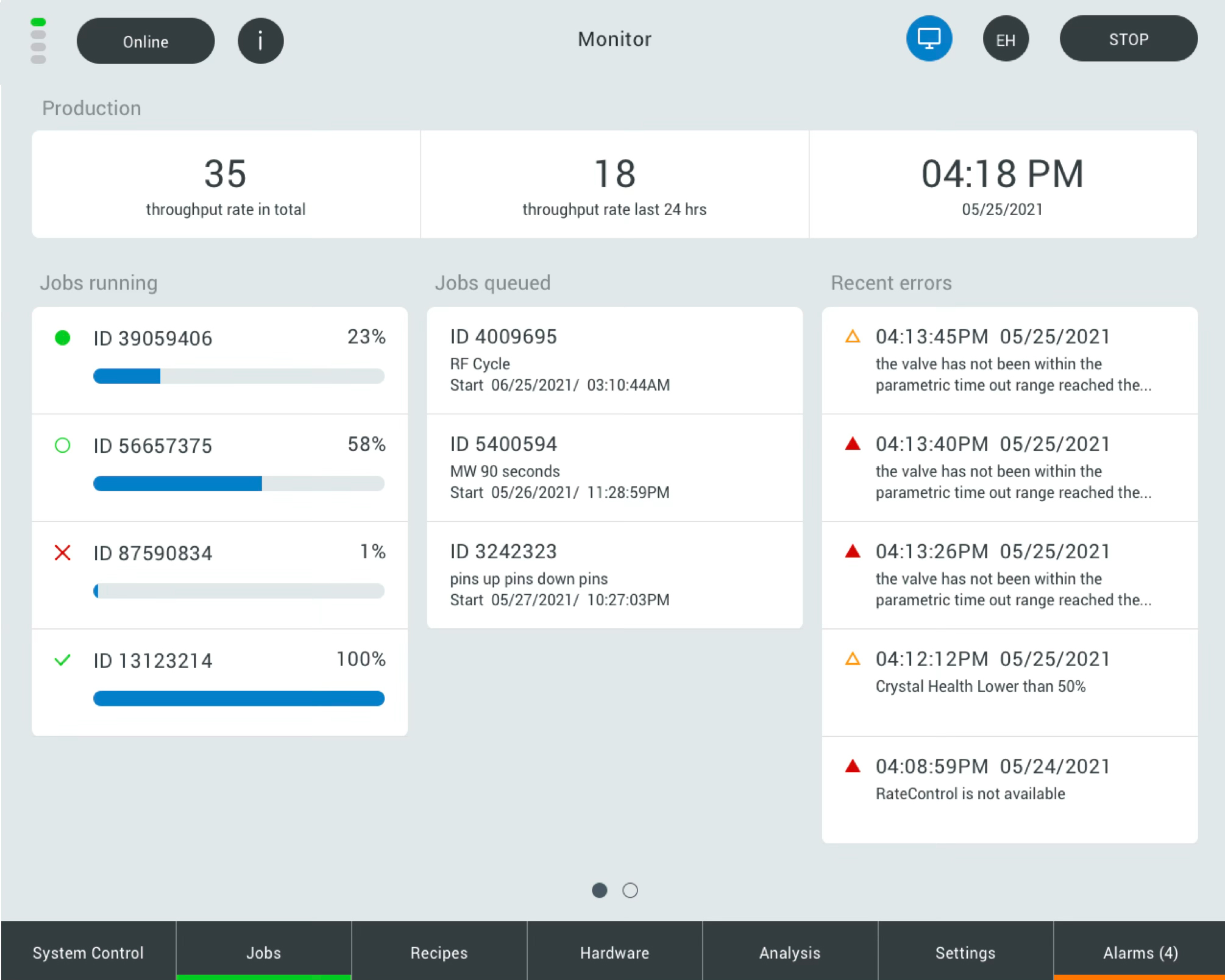
- Coherent information architecture: All modules follow a uniform structure that takes into account recurring processes and data flows. Users find their way around more quickly — regardless of the context.
- Consistent terminology: Terms, conditions and tasks are uniformly identified across product boundaries. This reduces misunderstandings and makes communication and training easier.
- Situational interactions: Interaction patterns were defined in such a way that they work in technical applications. Relevant information is clearly prioritized, processes are logically sequenced.
- Expandability and modularity: The UX base is scalable. New modules or functions can be consistently integrated without destabilizing existing user experiences.
This structure acts like a “UX framework” for the product family — it provides orientation without restricting functionality.
Solution
The joint UX concept resulted in a modular, consistent UX system for the Kontron AIS product family:
- Coherent information architecture: All modules follow a uniform structure that takes into account recurring processes and data flows. Users find their way around more quickly — regardless of the context.
- Consistent terminology: Terms, conditions and tasks are uniformly identified across product boundaries. This reduces misunderstandings and makes communication and training easier.
- Situational interactions: Interaction patterns were defined in such a way that they work in technical applications. Relevant information is clearly prioritized, processes are logically sequenced.
- Expandability and modularity: The UX base is scalable. New modules or functions can be consistently integrated without destabilizing existing user experiences.
This structure acts like a “UX framework” for the product family — it provides orientation without restricting functionality.
Solution
The joint UX concept resulted in a modular, consistent UX system for the Kontron AIS product family:
- Coherent information architecture: All modules follow a uniform structure that takes into account recurring processes and data flows. Users find their way around more quickly — regardless of the context.
- Consistent terminology: Terms, conditions and tasks are uniformly identified across product boundaries. This reduces misunderstandings and makes communication and training easier.
- Situational interactions: Interaction patterns were defined in such a way that they work in technical applications. Relevant information is clearly prioritized, processes are logically sequenced.
- Expandability and modularity: The UX base is scalable. New modules or functions can be consistently integrated without destabilizing existing user experiences.
This structure acts like a “UX framework” for the product family — it provides orientation without restricting functionality.
Impact
The UX concept has significantly improved the usability of the Kontron AIS product family:
- Faster orientation: Users find tasks and information faster because they follow a consistent structure.
- Lower cognitive load: Technical complexity is retained, but can be managed through clearer priorities, consistent terms and recognizable patterns.
- Better scalability: New modules and features can be built on the same UX basis. This reduces development, training and support costs.
- Participation in different roles: From operational users to engineering teams: Everyone benefits from a common UX language and an understandable structural framework.
Overall, UX work improves the efficiency, comprehensibility and quality of software interaction across the entire product family.
Impact
The UX concept has significantly improved the usability of the Kontron AIS product family:
- Faster orientation: Users find tasks and information faster because they follow a consistent structure.
- Lower cognitive load: Technical complexity is retained, but can be managed through clearer priorities, consistent terms and recognizable patterns.
- Better scalability: New modules and features can be built on the same UX basis. This reduces development, training and support costs.
- Participation in different roles: From operational users to engineering teams: Everyone benefits from a common UX language and an understandable structural framework.
Overall, UX work improves the efficiency, comprehensibility and quality of software interaction across the entire product family.
Impact
The UX concept has significantly improved the usability of the Kontron AIS product family:
- Faster orientation: Users find tasks and information faster because they follow a consistent structure.
- Lower cognitive load: Technical complexity is retained, but can be managed through clearer priorities, consistent terms and recognizable patterns.
- Better scalability: New modules and features can be built on the same UX basis. This reduces development, training and support costs.
- Participation in different roles: From operational users to engineering teams: Everyone benefits from a common UX language and an understandable structural framework.
Overall, UX work improves the efficiency, comprehensibility and quality of software interaction across the entire product family.


%201.png)
“UseTree got us off the ground competently and sustainably with a stringent concept and responsive design. Our vision of the application, which seemed impossible before, is now already on the market and we are very happy with the result and the collaboration! ”
Michael Arndt, Product Development Team Leader, Kontron AIS GmbH
Lorem ipsum dolor sit amet, consectetur adipiscing elit. Suspend Varius Enim in Eros Elementum Tristique. Duis cursus, mi quis viverra ornare, eros dolor interdum nulla, ut commodo diam libero vitae erat.
Lorem Ipsum Dolor Sit Amet